Blog
How to Pay for Spotify Premium in Nigeria in 2026 (Virtual Card, Gift Card and More)
Why Paying for Spotify Premium in Nigeria Is Harder Than It Should Be
Spotify Premium costs about ₦1,600 per month in Nigeria — one of the lowest subscription prices on the continent. Yet thousands of Nigerians still cannot complete the payment. The problem is not willingness; it is infrastructure. Most local Naira debit cards issued by Nigerian banks are blocked from processing international subscriptions. Your GTBank, Access, or UBA Naira card will almost certainly fail on the Spotify payment screen.
This guide walks you through every payment method that actually works in 2026, how to set each one up, and how to troubleshoot the most common errors.
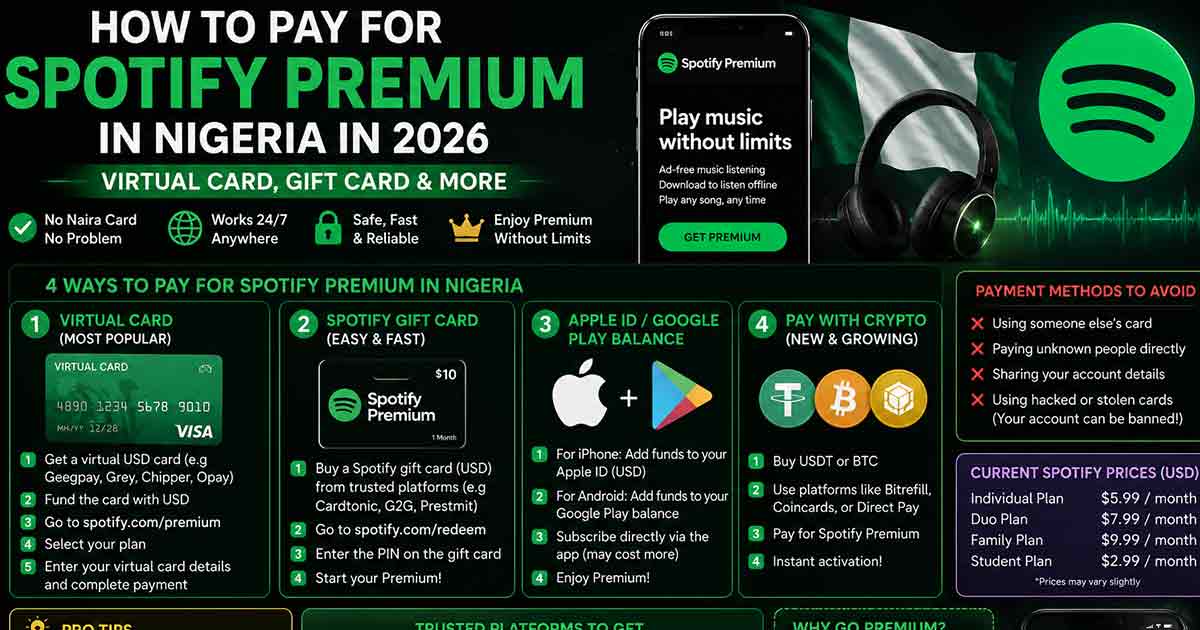
Method 1: Use a Virtual Dollar Card
This is the most reliable and widely used method. Virtual dollar cards are prepaid USD cards that work on international platforms like Spotify, Netflix, and Apple. Several Nigerian fintech apps offer them.
Best Virtual Dollar Card Apps for Spotify in Nigeria
- Chipper Cash — Free virtual dollar card, fast setup, supports recurring Spotify charges
- Barter by Flutterwave — Widely used, reliable for subscriptions, fund with Naira
- Grey (formerly Aboki Africa) — USD account with card, good for regular dollar payments
- Payday — Offers free virtual dollar cards funded in Naira
- Kuda (USD card) — Available to Kuda users with a valid BVN and dollar wallet
Step-by-Step: Pay for Spotify with a Virtual Dollar Card
- Download one of the apps above and complete BVN/identity verification (required by CBN regulation)
- Fund your Naira wallet and convert to USD — you need at least $1.50 to $2.00 to cover the charge and any rounding
- Generate or activate your virtual dollar card in the app
- Open spotify.com/ng or the Spotify app and go to Premium then Subscribe
- On the payment page, enter your virtual card number, expiry date, and CVV exactly as shown in the app
- Enter the billing address as your Nigerian address — or use a US address if the card requires it (check your card app)
- Complete the payment. Spotify will charge a small authorization hold (usually $0.10–$0.30) before the full monthly charge
Tip: Make sure your card has a small USD balance the day before renewal. Spotify will auto-retry the charge, and a failed renewal can pause your Premium access.
Method 2: Use a Spotify Gift Card
Spotify gift cards are prepaid codes that load credit directly into your Spotify account. They work regardless of your bank card situation and do not require a billing address or dollar account.
Where to Buy Spotify Gift Cards in Nigeria
- Gift card trading platforms — Sites that sell digital gift card codes; confirm the region matches Nigeria or is global
- Online marketplaces — Some verified vendors sell Spotify gift card codes via direct storefront
- International retailers — If you have a means to purchase from Amazon or US-based stores, US Spotify gift cards may work depending on your account region
How to Redeem a Spotify Gift Card
- Open spotify.com/redeem in your browser
- Log in to your Spotify account
- Enter the gift card PIN/code exactly as provided
- The credit will be applied to your account immediately
- Go to Premium and activate your subscription using the gift card balance
Important: Make sure the gift card region matches your Spotify account country. A US Spotify gift card used on a Nigeria-region account may fail. If you set your account to a different region to access a specific card, your local pricing will change.
Method 3: Telco and Carrier Billing (If Available)
Spotify has been expanding telco partnerships across Africa. In some markets, you can pay for Spotify through your mobile network operator — the charge goes directly to your airtime balance or postpaid bill. As of mid-2026, this is not yet widely available on major Nigerian carriers (MTN, Airtel, Glo, 9mobile), but it is worth checking your carrier's data or entertainment bundle page. Spotify's partnership strategy in Africa suggests this option may roll out to Nigeria soon.
Method 4: Ask a Friend Abroad to Gift You Premium
Spotify allows users to send Premium as a gift. If you have a trusted contact in the US, UK, or another supported market, they can purchase a Spotify Premium gift subscription and send it to your email. This is a legitimate workaround and works cleanly with Nigerian accounts.
Common Spotify Payment Errors in Nigeria and How to Fix Them
Your payment did not go through
- Your Naira debit card is blocked for international transactions — switch to a virtual dollar card
- Insufficient USD balance — top up your virtual card by at least $2 before retrying
- Card declined by issuing bank — some virtual cards have daily limits; check your app settings
This gift card is not valid in your country
- The gift card region does not match your Spotify account country — buy a Nigeria-compatible or region-flexible card
- Try contacting the seller to confirm the card's region before purchase
We cannot process your payment right now
- This is often a temporary Spotify server error — wait 30 minutes and retry
- Try switching to a different browser or clearing cookies
- If using a VPN, disable it. Spotify's payment processor flags VPN IPs
Card Authorization Hold Fails
Spotify places a small authorization charge ($0.10–$0.30) before billing. If your virtual card has exactly $1.60 and the hold takes it below the Premium charge threshold, the subscription will fail. Always keep a small buffer on your card.
How Much Does Spotify Premium Cost in Nigeria?
As of 2026, Spotify Premium in Nigeria costs approximately ₦1,600 per month for an individual plan. This is one of the most affordable Spotify prices globally — significantly lower than South Africa ($4.29) or Kenya ($3.23). Spotify has publicly stated it does not plan to raise Nigerian prices aggressively; instead, the company is focused on growing the number of paying subscribers through accessibility and local payment integrations.
Which Method Should You Use?
For most Nigerians, a virtual dollar card is the cleanest long-term solution. It handles automatic renewals, works across multiple platforms, and keeps your subscription running without monthly manual effort. If you prefer not to manage a dollar balance, a gift card is the lowest-friction one-time option. Either way, the ₦1,600 price point makes Spotify Premium genuinely accessible — the only real barrier is finding the right payment path, which this guide covers.
Final Checklist Before You Subscribe
- You have a virtual dollar card with at least $2.00 loaded — or a valid Spotify gift card code
- Your Spotify account country is set to Nigeria
- You are not using a VPN during payment
- Your card app notifications are on so you can confirm the charge
- You have noted your renewal date to ensure funds are available next month
With the right setup, paying for Spotify Premium in Nigeria takes less than five minutes. The platform is worth it — ₦1,600 a month for ad-free listening, offline downloads, and full audio quality is a straightforward value exchange for regular music listeners.